
Everything Reso does.
Bookings, GST billing, expenses, guest messages, staff logins and your own booking page, all in one app for resorts, homestays and houseboats.
Bookings and calendar
See every room, every day.
- Booking formDates and optional times, adults, children, rooms, meal plan, inclusions and remarks. Booking IDs number themselves.
- StatusPending, Confirmed, Completed or Cancelled on every booking.
- CalendarCheck-ins, check-outs, on-hold days, same-day turnovers and stays that run across months.
- No double bookingA room that is already taken for your dates is greyed out. If you are full, add the guest to the waitlist.
- Rooms, villas and cottagesSet type, capacity, amenities, base price, seasonal rates and discounts. Mark a room Active, Under maintenance or Out of order.
- Whole villa or by the roomBook the whole villa and its rooms are blocked. Book a room and the villa shows as unavailable.
- Guest details and IDAdd several guests to a booking, each with phone, date of birth, address and an ID proof photo.
- Where the booking came fromNewMark it Direct, Reso Stays, Booking.com, Airbnb, Agent or Other.
- Audit trailSee who changed a booking or an invoice, and when.
GST and non-GST billing
Bills that follow the rules.
- Tax invoices and billsMake a GST tax invoice or a bill of supply from the booking, and share it as a PDF.
- B2B and B2CNewMark each bill B2B or B2C. The choice is saved with the bill.
- Tax splitCGST and SGST, or IGST, depending on the state. Add SAC/HSN codes, per-item discounts and a custom GST %.
- Customer registerKeep each customer's GSTIN and address so the next bill takes seconds.
- Invoice registerFilter by B2B, B2C, unpaid, GST or non-GST. Cancel a bill with a reason; every change is logged.
- GSTR-1 exportDownload B2B and B2C CSV files for your accountant.
Money and reports
Know what you actually earn.
- Honest profitRevenue and profit count only bookings that are fully paid and completed.
- OutstandingConfirmed or completed bookings that are not fully paid show up as Outstanding.
- Advance and balanceRecord the advance, discount and pending amount, with a payment status on each booking.
- ExpensesLog salaries, repairs, supplies and utilities month by month.
- Balance sheetDaily income and expenses, downloadable to Excel.
- ReportsA monthly dashboard with revenue, profit, expenses and outstanding, bookings by status, and revenue per room.
Marketing tools
Bring guests back and collect reviews.
- Guests saved for youEvery guest is saved when you save a booking with a phone number. Banned guests are always left out.
- Win-back listsLast stayed about 6 months ago, about 11 months ago, birthday in the next 7 days, birthday today, cancelled this year or last, or everyone.
- Ready messagesEach list has messages already written, with the guest's name filled in. Edit them and save your own.
- Slide to sendWhatsApp opens with the message ready and you send it from your own number, one guest at a time.
- Google review campaignPaste your Google review link once. Mark each guest as Not asked, Asked, Reviewed or Skipped, with a reason if you skip.
- Booking confirmationA ready message for WhatsApp, with or without amounts. Edit the wording for your property.
- Flagged guestsNewKeep a list of guests to watch out for or not accept.
Your team
Give staff a login and keep the numbers private.
- Three rolesAdmin, Manager and Receptionist. Managers and admins see the money and the balance sheet.
- Their own sign-inAdd staff with their email. Only the admin manages employees and property details.
- One plan for everyoneStaff follow your plan. When your plan ends, their access ends too.
- Stored on GoogleBookings, guests and ID photos are kept on Google Firebase. Each property reaches only its own records.
Free page on Reso Stays
Guests find you and send their dates.
- Your own page, free to listNewPhotos, description, rooms with online prices, rules, contact buttons and a QR code at stays.resoapp.in. No listing fee and no commission.
- Claim a page we addedIf a Not verified page for your stay already exists, claim it and we mark it Verified once we have checked.
- Booking requestsGuests send dates and the room is held for 30 minutes. You confirm or decline, then reply on WhatsApp.
- Price per stay, day or personSet the online price each way, per room.
- Share itWhatsApp share, QR code, and a button to put on your own website.
On every device
Phone, tablet or the office computer.
- Android appGet it on Google Play.
- iPhoneAdd the web app to your Home Screen. No App Store needed.
- ComputerA full desktop layout with a sidebar and quick search (Ctrl or Cmd + K).
- Works offlineBookings and bills saved without a signal sync when you are back online. A sync status screen shows what is waiting.
What Reso doesn't do, and why that's good for you.
Five things we leave out, and what each one means for your stay.
- Your calendar stays yoursReso doesn't sync with Booking.com, Airbnb or agents, so no other site can change your calendar. You add those bookings yourself and mark where they came from, and Reso blocks the dates.
- Every message comes from youReso doesn't send WhatsApp messages automatically. Each one opens in your own WhatsApp and goes out one guest at a time when you tap send, so guests hear from you and not from a bulk sender.
- Guests pay you directlyReso doesn't take online payments, so no payment gateway sits between you and your guests. They pay you at the property, and Reso takes no commission.
- Plain English, your language for guestsThe app isn't in Malayalam yet. It uses simple English words, and you can type guest names, addresses and notes in Malayalam.
- Nothing to download on iPhoneThere is no App Store app. On iPhone you add Reso to your Home Screen from Safari, so there is no App Store download or update to wait for, and you always have the latest version.
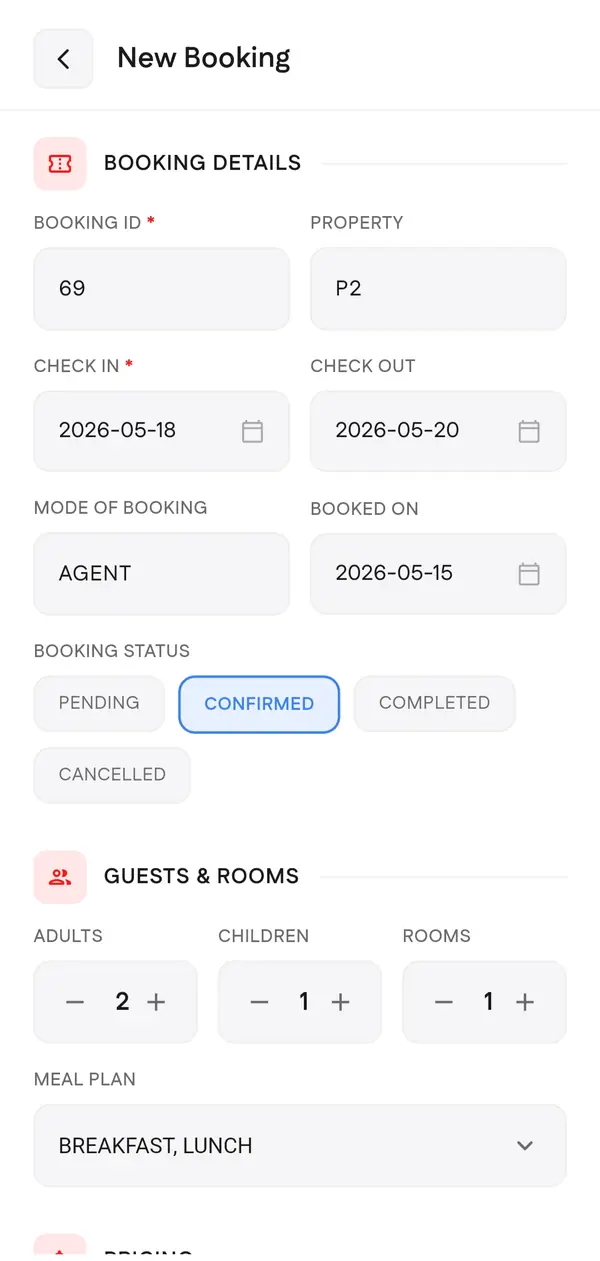
The new booking form on a phone.
Start with your next booking.
30 days free, no card. Then ₹5,300 a year. Questions? We answer on WhatsApp.